Demystifying REST API: A Simple, Step-by-Step Guide for Developers
May 30, 2026
#Web Development#API#Backend#Programing
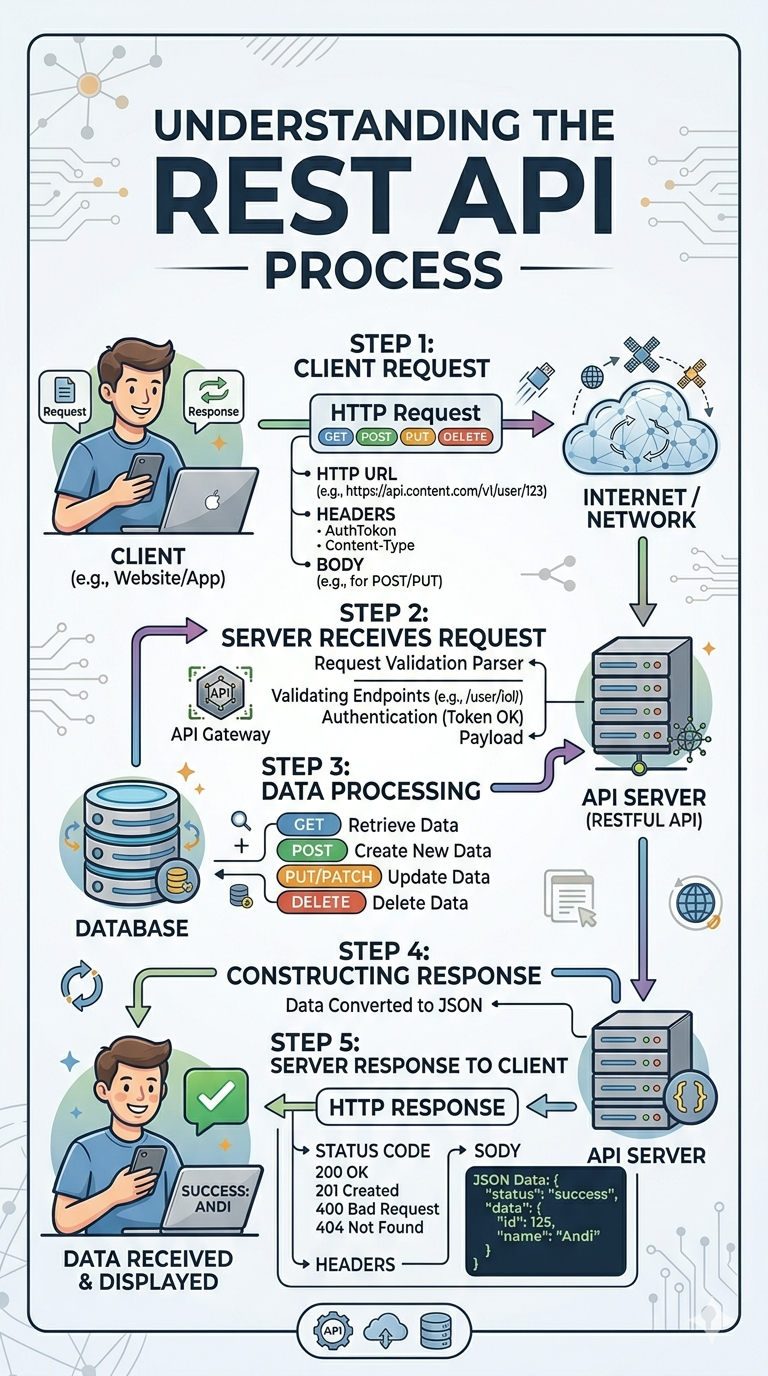
Ever wondered what actually happens behind the scenes when a client sends an HTTP request? Let’s break down the REST API life cycle in 5 simple, human-readable steps—from the initial request to the final JSON response.
Have you ever wondered how your web or mobile app talks to a database miles away? The magic word is **REST API**.
While it sounds highly technical, the actual process is straightforward. Let's break down the complete life cycle of a RESTful API into **5 simple steps** that anyone can understand.
---
### 1. The Client Request (The Trigger)
It all starts with the **Client** (your web app, mobile app, or frontend framework like React/Next.js). When a user interacts with the app, the client triggers an **HTTP Request**.
This request contains crucial components:
* **HTTP URL (Endpoint):** The specific path, e.g., `https://api.domain.com/v1/user/123`
* **HTTP Methods:** Action verbs like `GET` (retrieve), `POST` (create), `PUT/PATCH` (update), or `DELETE` (remove).
* **Headers:** Metadata like `AuthToken` for security and `Content-Type: application/json`.
* **Body:** The actual payload (data) you want to send (mainly used for POST and PUT).
### 2. Server Receives Request
The request travels through the internet/network and hits the backend architecture. Often, it passes through an **API Gateway** before reaching the main **API Server**.
Here, the server acts as a gatekeeper and runs a **Request Validation Parser** to verify three things:
1. Is the endpoint valid?
2. Is the user authenticated? (Does the Token check out?)
3. Is the payload format correct?
### 3. Data Processing (The Heavy Lifting)
Once the request is validated, the server takes action based on the HTTP method. It communicates with the **Database** to perform operations:
* **GET** ➡️ Fetches specific data.
* **POST** ➡️ Creates a brand-new record.
* **PUT/PATCH** ➡️ Updates existing records.
* **DELETE** ➡️ Erases data.
### 4. Constructing the Response
After getting or modifying the data, the server doesn't just throw raw data back. It packages the result neatly. The processed data is typically converted into a clean, universally understood format: **JSON (JavaScript Object Notation)**.
### 5. Server Response to Client (The Return)
Finally, the server sends back an **HTTP Response** to the client. This response includes:
* **Status Code:** Indicators like `200 OK` (Success), `201 Created`, `400 Bad Request` (Client error), or `404 Not Found`.
* **Body:** The JSON payload containing the requested data or status messages.
The client receives this response, parses the JSON, and displays the fresh data beautifully on the user's screen.
---
### Wrap Up
And that's it! Every time you like a post, log into an app, or update your profile, this 5-step cycle happens in milliseconds behind the scenes.
*Take a look at the clean, hand-drawn architecture diagram attached below to easily visualize this flow for your next project!*